Monday, August 14, 2017

Building Technology Bridges

A version of this blog article was originally posted on Vertafore Voices, an internal company blog for employees to share perspectives.

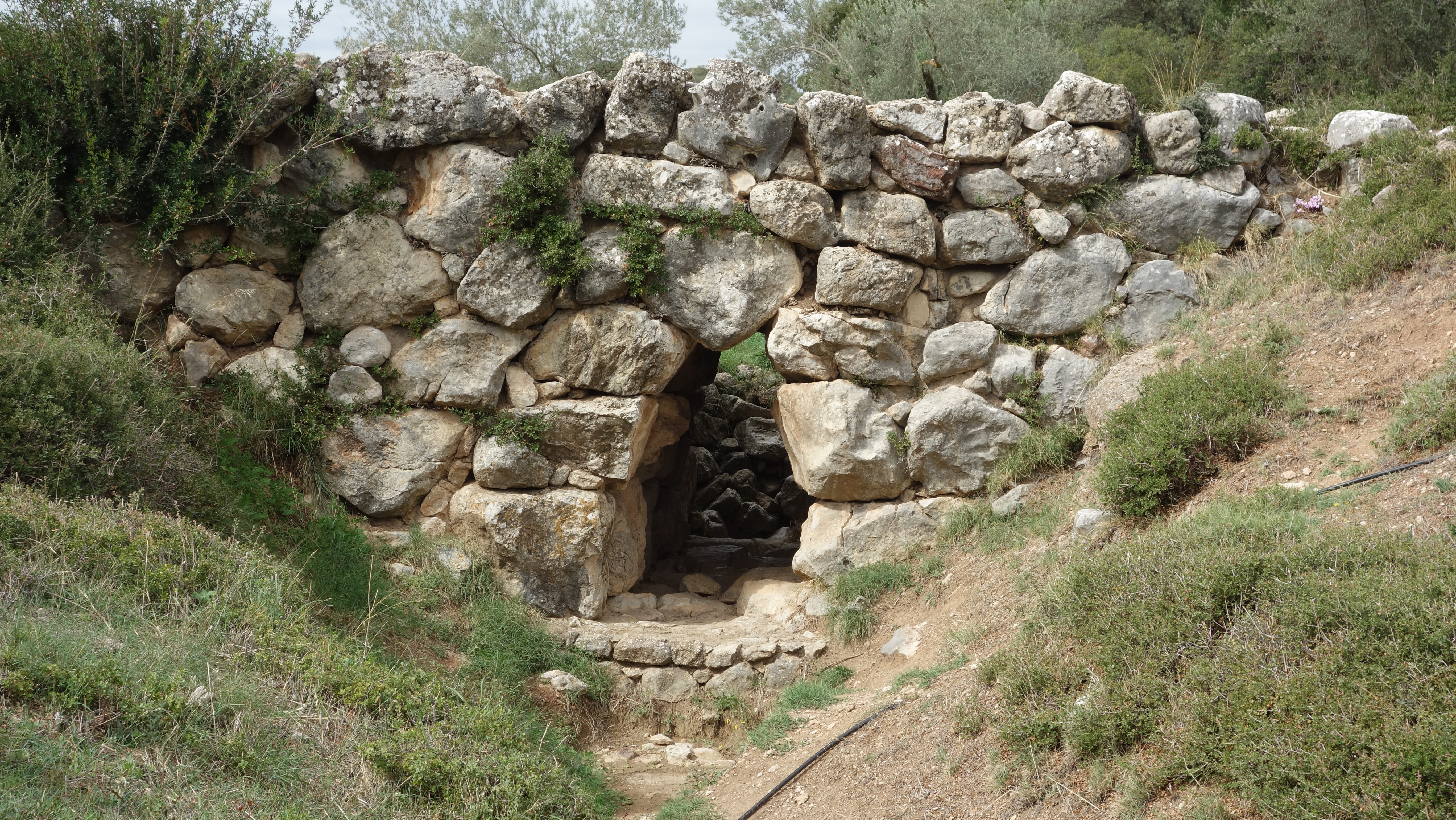
Bridges are one of the most basic pieces of infrastructure for any civilization. The Arkadiko Bridge in Greece (pictured) is one of the oldest known stone arch bridges in the world. It was built in the Bronze Age more than 3,000 years ago for use by chariots. The chariots are long gone, but the bridge still stands today.


Not all bridges need to last so long, however. Ancient empires like China, Persia, Greece, and Rome all had engineers to construct temporary floating bridges made of boats to get their armies across rivers and straits. These were torn down after crossing to prevent enemies from using them, and to send a clear message to their own troops: we are only going forward, not back. Floating bridges of this type are still used today, such as the Guangji floating bridge in Chaozhou, China (pictured).


In our fast-paced world of technology, it is often necessary to build temporary spans between the technologies of the present and the future. I call these technology bridges.

Hybrid cars are a good example of what I mean by a technology bridge. They span the present world of fossil fuel powered cars and the future world of electric cars. They provide a way for car manufacturers and drivers to become more familiar with electric vehicle technology, and they’ll be needed until the day when the infrastructure for electric car recharging is as convenient and pervasive as gasoline filling stations are today.

Here is a smaller scale example of a technology bridge that I used in my job as as software development engineer in test (SDET).

My employer recently installed Team Foundation Server (TFS) 2017. This product includes powerful release management tools, but these tools are not yet installed at our company.

Meanwhile, our current release management system, which I helped to design and implement, is based on Jenkins, and integrates with an older version of TFS, making it incompatible with TFS 2017, at least for now. Many of our development teams are still using the older TFS version, so we cannot drop support for it yet.

So how can we release code that was built with TFS 2017? Here is how.

Software code stored in TFS 2017 is built in such a way that it LOOKS LIKE it was built by our Jenkins server. This process allows our current release management system (also using Jenkins) to release the software, even though it was built by TFS 2017, not Jenkins.

The solution is a temporary technology bridge between how we build and release software today (Jenkins) and how we will build and release software tomorrow (TFS 2017).

Technology bridges are useful because they buy time. Just as it takes time to move an army across a river, it can take time to move an organization from one type of technology infrastructure to another. Both processes involve lots of moving parts. Technology bridges allow part of your organization to remain on one side of a technology divide while others have already crossed over. Once everyone has crossed over, you can tear down the temporary bridge. Then everyone can march forward together.

Thursday, January 12, 2017

The Three Laws of Automation

A version of the following blog article was posted on Vertafore Voices, an internal company blog for employees to share perspectives.

I am not a fan ​of self-driving cars.
That may seem like a surprising statement coming from me.
I have spent most of my software engineering career working on automation. Automated builds, deployments, tests, and even infrastructure, you name it, I have found ways to make software drive itself without human intervention.
I believe that automation is a good thing that can make our lives better. But not all automation is practical or desirable.
Science fiction fans may remember Isaac Asimov's Three Laws of Robotics from his Robot series of novels:
  1. 1. A robot may not injure a human being or, through inaction, allow a human being to come to harm.
  2. 2. A robot must obey the orders given it by human beings except where such orders would conflict with the First Law.
  3. 3. A robot must protect its own existence as long as such protection does not conflict with the First or Second Laws
When I consider whether or not to automate a task, I look at three simple rules. Inspired by Asimov's list, I call them the Three Laws of Automation:
  1. 1. A human shall not automate a task that happens infrequently
  2. 2. A human shall not automate a task that is not well defined
  3. 3. A human shall not automate a task that requires creativity
These simple rules go a long way in helping me to determine if automation is worth doing. To see how they apply, let's look at a task that automation is frequently applied to: testing software.
Automated testing happens frequently. Ideally every test case is run every time the software is built, potentially multiple times per day. In practice, developers have unit tests which run very fast every time the software is built, and system tests which run less frequently, say once a day,  because they take longer to run on limited hardware. Still, software testing satisfies Law 1.
Software testing is well defined. A well-written test case is a series of action steps followed by a verification step. Did the expected result occur, Yes or No? If Yes, the test case Passed. If No, the test case Failed. Software testing satisfies Law 2.
Running software test cases manually requires no creativity.  It is repetitive and mindless. Most software testers dislike that part of their job, and are happy to hand that over to a machine. Other parts of the software tester's job, such as test design, interpreting test results, and troubleshooting failures, are creative activities. They require intelligence, imagination, and insight. Automating those tasks is possible, but is much harder, and tools that automated those tasks are not widely adopted, for the simple reason that people enjoy doing creative tasks. 
In any case, running software tests satisfies Law 3. Since all Three Laws of Automation are satisfied, it makes sense to automate software testing.​
There are many other examples in daily life where what was once a manual task has been automated during our lifetimes. Here are just a few: maps, filing personal income taxes, buying airplane tickets. You can probably think of many others. In each case the Three Laws of Automation apply.

How about those self-driv​​ing cars?
Law 1 certainly applies to cars. Driving is a frequent task that most of us have to do every day.
What about Law 2? Is driving well defined? Not even close.
Consider what makes for a successful taxi or rideshare passenger experience. Being a good driver is about much more than being able to deliver your passengers quickly, to the right location, without getting pulled over by the police, or without injuring or killing anyone or damaging property. Typically they involve local knowledge, friendliness, confidence, and many other things that cannot be described to a computer. And this has to be done while traveling together with other drivers and pedestrians who may or may not behave rationally.
We could stop here, but what about the Third Law of Automation? Is driving creative? Absolutely.
Driving can feel routine and monotonous most of the time. But that is an illusion. Routine driving is not stable. It can become emergency driving in a fraction of a second, at any time.
One day my wife was driving our family back from a road trip. Traffic on the highway was light, weather was good, and the situation was so routine that I was able to nap in the front passenger seat.
Suddenly a large tire came loose from a truck going the opposite direction on the highway. It bounced towards our car at over a hundred miles an hour. My wife instantly realized that she needed to speed up rather than slow down to avoid it. Because of her quick thinking, the tire bounced just behind our car by inches and rolled harmlessly to the side of the road. We made our way home safely with a great story to share but none the worse for the experience. If not for my wife's counter-intuitive reaction, we would have been in a major accident.
I don't know how to describe such a situation to a computer. I don't believe that anyone does. I could say the same about much less extreme situations that happen in driving every day.
For me, cars are a bad candidate for automation, at least at the present state of technology. We would need something very close to Asimov's imaginary robots, with their powerful sensors, ability to think creatively, and hyper focus on the fragility and sanctity of human life, for self-driving cars to be safe.
Self-driving cars also feel to me like an attempt to automate the technology of today rather than the technology of tomorrow.
Consider how the car replaced the horse in personal transportation. Though we speak of horsepower, a car is nothing like a horse. A mechanical horse powered by an internal combustion engine would be a monstrosity. That is probably why such a thing was never built. A car is so much simpler.
We should be asking the question: How do we automate the movement of people? There may be answers to that question that are completely different from, and much simpler than, a self-driving car.
Software automation can be like that too. Instead of automating what you are currently doing by hand, ask yourself if the task could be done in a completely different way that would be easier to automate. The Three Laws of Automation can be helpful in checking if you are on the right track.

Thursday, December 29, 2016

Why presenting could be good for your career

In October I presented a paper at an engineering conference, the first time I have done that in many years. Writing the paper and organizing my thoughts into a coherent story was hard work, but I believe it will help my career in several ways, especially if I keep doing it. Here are some of the benefits I see for being an author and presenter.


It focuses your attention on how you speak not just what you say


Presenting at a conference forces you to notice what other presenters are doing and how they do it. The best speakers will admit that it does not come naturally, it takes practice and getting in the habit of constantly paying attention to what you are doing. 

I see this as a kind of mindfulness. Even if I am pacing back and forth nervouslessly while answering a challenging question, and cannot stop myself at that time, I can at least be mindful in the moment that I am doing it, and have a better chance of managing that reflex the next time. And the ability to be mindful can provide benefits in life generally.


It may help you to be more confident


Confidence comes with doing. Once you have done something challenging, even in a way that leaves room for improvement, no one can take away from you the fact that you did it and survived. More likely than not, most of your colleagues have never done that.

This applies to being an author or presenter. Submitting an abstract is an act of confidence. Submitted a paper for review by strangers is an act of confidence. Standing in front of a group of strangers to present is an act of confidence. So is doing it again.


It may convince you that you know your stuff


I am starting from the assumption that you do know your stuff, because you do. If you have ever had a job, it is because you are good at something. You have probably learned many things during your career, some of which are esoteric, but much of which would be of interest to others.


It may help you tell a more coherent story about yourself


Any presentation, even if it is about work, is part of your own story. It is very easy in the busy pace of modern life, to neglect taking the time to tell your own story. Nothing could be more important in life.

Any presentation should include an About Me slide. Don't just talk about your job or your employer. Don't neglect the personal stuff. Tell people something about what you like, what you do for fun, and what you have learned along the way.

Friday, October 28, 2016

PNSQC Videos Available

Videos of presentations from the 2016 Pacific Northwest Software Quality Conference are now available:

https://www.youtube.com/channel/UCpa3JPid8-N0OnEKDqvGY1A/videos

There were lots of good talks at the conference.

Here is the video of my talk on Breaching Barriers to Continuous Delivery:

https://www.youtube.com/watch?v=FllOIVczkxc


Tuesday, October 18, 2016

PNSQC Presentation

Today I gave my presentation at the Pacific Northwest Software Quality Conference (PNSQC) 2016 in Portland. My talk was about a continuous delivery system I helped to build at Vertafore. I had lots of fun presenting and am so glad I came. The people at the conference were very nice and great to work with.

Here is a link to my slides on SlideShare:
http://www.slideshare.net/seekerkeeper/breaching-barriers-to-continuous-delivery-with-automated-test-gates

Thursday, September 8, 2016

Presenting at Eastside DevOps Meetup group

I will be giving my presentation in Bellevue at the Eastside DevOps Meetup on Oct 5. Details at this link:

https://www.meetup.com/Eastside-DevOps-Meetup/events/233957320/

Wednesday, September 7, 2016

PNSQC Conference Schedule Available

The Conference-At-A-Glance schedule for the Pacific Northwest Software Quality Conference is now available:

http://www.pnsqc.org/2016-conference/conference-at-a-glance-2016/#

I will be presenting in the Management track on Tuesday, October 18.

Here is the link to my abstract:

http://www.pnsqc.org/breaching-barriers-continuous-delivery-automated-test-gates/


Tuesday, July 26, 2016

Presenting at PNSQC 2016

I haven't published to this blog in years, but decided it was time to bring it back from hibernation.

I have been accepted as an author at the 2016 Pacific Northwest Software Quality Conference in Portland, Oregon in October. 

I have done plenty of teaching and presenting internally at my employer for the past several years, but it has been almost a decade since I attended a public conference and even longer since I presented at one.

Last year I made a decision to advance my career by attending a conference this year and present if possible. I decided on the PNSQC conference because it is local and because it seemed to be well organized. The reviewers and organizers have been great to work with.

I am very excited about this opportunity.

More details coming soon.

UPDATE: The author page has been posted here:

http://www.pnsqc.org/chris-struble/

Thursday, May 15, 2008

OpenOffice.org seeking testers

OpenOffice.org is seeking beta testers for the OpenOffice 3 release. See the announcement.

One of the features mentioned in the announcement is partial support for DOCX, Microsoft's new document format and a direct competitor to the OpenOffice ODF format. According to the announcement, OpenOffice 3 will open DOCX files but not save to that format. Saving to the old DOC binary format will continue to be supported.

I'm glad to see that OpenOffice is providing limited, but only limited support for this format. Recently my wife got an email from a friend with a DOCX file attached. Our OpenOffice 2 doesn't open it. Nor can the vast majority of Windows and Office users.

Apparently Word 2007 saves to DOCX by default. Users who want friends to be able to actually open their files have to change it to DOC manually. What a cynical way for Microsoft to use novice users who don't know any better to spread its new file format around and waste people's time.

There are some solutions for Office 2003 users and even OpenOffice 2 users, but none of them are doable by novice users.

Kudos to OpenOffice.org for providing a light at the end of the tunnel for OpenOffice users whose friends unknowingly inflict these DOCX files upon them, without adding to their further proliferation.

Thursday, April 24, 2008

The end of free webmail

Reports in recent weeks like this and this that software programs are now able to crack those annoying CAPTCHA character recognition tests on major free webmail sites like Yahoo, GMail, and Windows Live are a big deal.

Some of the spammers now have very fast and accurate character recognition programs, while others may be using the obvious solution of paying humans to recognize the human-readable characters.

The prove-you-are-a-human strategy is fundamentally flawed, because it cannot tell the difference between a human who wants to use free email to send a few personal messages a day, and a desparately poor human in a developing country paid a few dollars a day to set up an account for a spammer to send a million messages a day. It will never be cost-effective to stop such activity.

The webmail providers will eventually have to accept the fact that they cannot prevent spammers from setting up accounts. That leaves them with few options. One option would be to severely limit the number of email recipients per day on free email to the point where such accounts would be unattractive to spammers, but still attractive to most users. But is there such a limit? That remains to be seen. Perhaps the only way to stop spammers is to charge per email recipient for all email sent from an account. That would put an end to free email entirely.

Such a move would not necessarily put an end to GMail and other webmail services. Having a personal email address that stays the same when you change ISPs is worth paying for. Now it's up to the IT industry to figure out how to make it pay off.

Friday, April 18, 2008

Before and after

In my new job, one of the features I'm testing is a web-based installer on Windows. One type of tool that can be very helpful for installer testing is a system snapshot tool. Tools of this type take a "snapshot" of the system before or after an install or uninstall and compare the two for differences. This type of snapshot is not a backup. The purpose is not to restore the system at a later time, but to determine what has changed and whether the actual changes match the expected changes.

After looking at several free and commercial snapshot tools, I settled on an open source tool called SupermonX. SupermonX snapshots can track the state of files, registry settings, and services, generate comparison reports across specific file or registry folders, and verify if a report matches an expected result. Output is stored in text format, and optionally, XML format. SupermonX also includes an Explorer-like user interface for viewing snapshot files, and command line options for running the snapshots and reports via batch script.

These features make SupermonX a good candidate for use in automated testing of the installation process. As time permits, I plan to build some tools around it to automatically snapshot before and after installs and verify that expected files, registries, and services are as expected.

Even without automation, a snapshot tool like SupermonX (I pronounce it "super monks" as in Chinese martial arts film) can help in quickly understanding what an installer is doing. That can help to generate good questions for your developers about what the installer should be doing.

With automated installer testing you can ask another class of questions, such as "I noticed that the whatever.htm file is no longer getting installed in today's build, is that intentional?" If it is intentional, your developer will probably be impressed that you are paying such close attention that you could catch a change that he didn't bother to tell you about. If it wasn't intentional, you may have a bug. Even better.

Thursday, April 3, 2008

Java MBT implementation

More and more implementations of the Model-Based Testing approach seem to be appearing. Here's another open source implementation I found recently: mbt.tigris.org.

This implementation is in Java and uses GraphML, an XML format for drawing graphs, as a modeling language.

GraphML is an interesting choice for a language. The example models have a lot of graphical drawing information in them that isn't needed for behavioral modeling. However, being able to create the models in a graphical tool is a nice feature.

Overall, a welcome contribution to the growing list of model-based testing tools and worth a look for anyone interested in such tools.

Update: My initial impression that this tool does not have support for variables or guard conditions was incorrect. That's what I get for commenting on a tool that I haven't taken the time to download and play around with yet. See the comments by Kristian, the tool's author.

Friday, February 22, 2008

Web Testing Framework released

This week I released my first open source testing project.

Hanno is a test automation framework in Java for dynamic model-based exploratory testing of web applications. It can be used to develop an automated testing tool for most web applications.

Hanno is built on several open standards and tools:

  • SCXML, an XML language based on Harel state charts.

  • Apache Commons SCXML, an SCXML implementation in Java.

  • Watij, a web application testing tool in Java.

Hanno implements a model-based test automation approach. To test a web application with Hanno, an SCXML model is created to describe the application behavior. A Java class is created with methods for each event or state in the model. Each method calls Watij code to execute the event in Internet Explorer, or to verify that the browser is in the correct state. The Java class is run by an engine with a simple algorithm to determine which event to execute next. The order of test execution is not predetermined.

Modeling a web application in SCXML is not difficult, but does require familiarity with state charts or finite state machines. I found SCXML quite easy to learn and understand. Hanno includes a simple example application to help get started.

Debugging a Hanno test tool can be a complex process, however, because it requires getting the SCXML model and the Java code that the model executes to work together and both be correct at the same time.

I recommend starting small, by modeling a simple behavior of your web application, testing it, getting it to work, then adding behavior incrementally.

I have used Hanno to test several web applications. With experience, a simple model of a web application's navigation can be built in a day or two. A more complex model with hundreds of events and states may require several weeks or a month. The end result can be a test tool than can do the work of hundreds of hand-crafted automated tests, run continuously, and find new bugs because new test sequences are executed on each run.

I developed Hanno primarily to meet my own needs and to implement my own concepts for how a model-based testing tool should work. It can certainly be improved, especially in the area of debugging and error handling. Java developers interested in test automation are welcome to join the project.

I encourage the software testing community to download Hanno and kick the tires. Please use the Hanno forums for any detailed questions or feedback.

Wednesday, February 13, 2008

The human context of quality

Recently the universe decided to test me to see how strong my commitment to software quality really was.

Last September my previous employer laid off its entire engineering staff. I interviewed with several companies, and was quickly hired as a senior test engineer at an Internet commerce company that sells publicly available personal information online. I had some concerns about working for a company that enables "spying on people", as one friend of mine put it. I also knew from prior experience that many public records contain outdated or inaccurate information. But it seemed on the surface to be a good opportunity to use my experience to help build a software quality department from the ground up.

After arriving, I learned that this company did software development very differently than any company I had worked for. The software development, quality assurance, and release cycle seemed deeply flawed to me. New features were released almost every day, with only minimal testing by developers, and no time for QA to plan thorough testing before release.

I had previously worked in Agile environments with release cycles measured in weeks, and on hot fix releases that had to go out in a day or two, but only to specific customers for whom the benefit of a quick fix outweighed the risk of a quick release. Working at this company was like doing a patch release to everyone in the world, every day.

I have a lot of experience testing web applications, and realized that in such an environment, I would be unable to catch most of the defects before release. To be fair, defects found in production were fixed quickly. Still, I saw no way to be successful as I usually define it. Still I did the best I could for as long as I could.

Was this company wrong to develop software this way? Some would say no. For example, in the context-driven approach to software testing, there are no best practices that apply to the entire software industry. QA exists to provide information to the development team, nothing more. QA must use processes that are appropriate to the business and the practices of a company, whatever they are. Releasing lightly tested code would be criminal in the aerospace or medical industries, but for an e-commerce company selling public information, it might not be.

I still thought it was wrong. Even when a company has good customer support, and the worst consequence of a customer getting charged for bad information is a refund, the software has still wasted the customer's time and created unnecessary confusion and stress in their lives. The corporate context is not the only context that matters. Software that interacts with human beings should treat them humanely.

I saw little chance of convincing the company of that view. After all, they had been doing this for years, and their company was growing and seemed to be doing well financially. Some of the people I would have to convince to change the development process had designed that process in the first place. These same folks owned a lot of stock in the company, and were set to make millions when the company went public. Why should they listen to me?

I did some testing of my own. I proposed various small changes to the software process that were well justified and should have been relatively uncontroversial. I couldn't get my development manager to approve any of them.

The conflict between the company's values and my own began to create more and more stress for me. I finally reached a point where the stress of having to find a new job seemed less terrible than what I was experiencing every day. Three months after I started, after a particularly bad day, I resigned.

I don't blame the employer for the mismatch. It's hard to see a values conflict coming until you experience it. Still, there were signs in the interview that I should have paid more attention to, and questions that I could have asked but did not. The experience has helped me to a deeper understanding of what type of work environment I need, and what types of companies I would consider working for in the future.

Saturday, November 24, 2007

QaTraq Lite

Recently I wrote about the QaTraq test management tool, and hinted that it could be used in a lightweight manner suitable for agile software development environments with very short release schedules.

The approach is to use only the features of QaTraq that are essential for a rapid release environment, and to give up several unnecessary assumptions.

One of the assumptions made in QaTraq is that a new test plan will be created for each release. For a live web site with releases every day, this is not a good assumption. In the time it would take to copy and customize a test plan for each daily release, there would be little time to test before the release went out the door.

An alternative is to use the "test plan" of QaTraq as a living repository of all the test cases appropriate to a particular application or feature area. When test cases need to be rerun, they are run in the same test plan.

In this approach, new test results overwrite old results, so the results database becomes a snapshot of only the most recent result for each test case rather than all results. In my experience, though, test results from past releases are almost never used, even in more traditional software development environments.

Another assumption in QaTraq is that Products are the major categories used for reporting purposes. But if test plans are used as living repositories of test cases rather than being associated with a specific release, Products become almost unnecessary.

Products cannot be completely ignored in QaTraq because test cases and test scripts in QaTraq must be associated with a Product, but there is nothing that requires that more than one Product be used. By defining only a single Product with a single Version in QaTraq, all new test cases will be automatically assigned to that Product and Version with no extra work required.

The built-it reports of QaTraq are based around Product, so it will be necessary to create your own reports to track test results by test plan, design, and script. This is straightforward using PHP, which must be installed to run QaTraq anyway. To build queries for your custom reports, PHPMyAdmin is very useful interface to MySQL. I recommend installing it on any server running QaTraq.

The above is the essence of what I call the "QaTraq Lite" approach. The keys points are:

* Use Test Plans as living repositories of test cases and results rather than for a particular release. Add tests when you need them, rerun tests when you need to.

* Create a single Product with a single Version. All test scripts and cases will be associated with this Product automatically.

* Report test results by test plan, test design, and test script instead of by Product. A test case shows up in reports wherever you put it. No need to maintain a separate physical hierarchy and reporting hierarchy. They are one and the same.

This approach reduces much of the management overhead of using QaTraq to track your tests, even in an agile environment with daily releases.

Saturday, November 10, 2007

Mac migration

Today I started converting and migrating files from our iMac G4 to my new PC. Our Mac has been collecting dust for the past couple of weeks since I made the PC my primary home computer.

The first step was to get the PC and Mac to network together. I have a wireless hub with Ethernet so establishing a basic network connection was straightforward, the two devices could ping each other right away. I tried enabling Windows Sharing and FTP Sharing on the iMac, and neither worked. I put the devices on the same workgroup, also nothing. I found a note that suggesting that resetting the user passwords might help, but no go. Finally enabled Remote Login on the iMac, and used WinSCP to connect via SSH. That worked.

Once I was able to move files, I started the process of converting them. Many of the files were in AppleWorks format and had to be converted to a format readable by OpenOffice before I could move them over. I converted all the text files to RTF and spreadsheet files to Excel format. I also had several old AppleWorks database files that I wasn't able to convert. I didn't find a free tool to solve that problem.

Next I had to get my music on the PC. I have a Mac-formatted iPod so tools like iPodCopy and iPod2Computer couldn't recognize the device. I had to copy the music files from the Mac over the network via WinSCP. It took a while.

Once I got my music files on the PC, I installed iTunes and authorized the PC at the iTunes Music Store. Next I had to restore the iPod and reformat it for the Windows version of iTunes.

The reformat wiped my Contacts from the iPod, but a while back I had imported them into the Thunderbird address book on the PC. But how to get them from Thunderbird to the iPod? I found MozPod, a Thunderbird extension that solves this problem. When I first downloaded MozPod, it tried to install itself as a FireFox extension, which failed since it isn't designed for FireFox. Once I got it to install into Thunderbird, it worked perfectly.

Overall the migration took about 14 hours, most of that time spent cleaning up, converting, and copying the last ten years of my family's digital life. I'll find out in the next few days how much of the data actually made it over successfully.

Thursday, November 8, 2007

QaTraq lessons learned

One of the essential tools for a software quality team is a test management tool. Test management is simply the process of storing test cases in a database, and organizing them in a way that makes it easy to plan, coordinate, and measure the testing activity.

I've worked with many test management tools in my career in software quality, from home-grown tools to commercial ones. But one of the most useful I've worked with is QaTraq, which I used at my last employer, Haydrian Corporation.

QaTraq was a good fit a Haydrian for several reasons. We had a small team of 3-4 developers and we needed to be coordinate and measure our testing. We didn't want to spend a lot of money on commercial test tools, but we preferred an open source product with support behind it. Our product was an appliance with releases several times a year, and smaller patch releases more frequently.

QaTraq is built around the concept of test plans. Test plans contain test designs which in turn contain test scripts. Each level is required. This hierarchy is deep enough to be configurable for most needs, but the fact that you have to fill in every level of the hierarchy creates extra work. For projects that have named release versions (e.g. version 2.2.2) and which release no more often than once a week, the overhead of copying or creating a test plan for each release is manageable. For projects that release every day, the overhead may be too difficult to manage.

One practice I can recommend is using descriptive and distinct names for test plans and other entities. When your test cases get into the hundreds or thousands, test case names like INSTALL_00001 aren't going to be that meaningful. Names should also be short so they will fit into the QaTraq drop down menus.

Another consideration with QaTraq is the fact that once you execute a test case, you can't delete it because it is tied to a test result. You can only remove it from a script. This makes it necessary to have a strategy for marking test cases as deprecated so they don't get added to future test plans.

One approach is to have a "master" test plan which is a superset of all known good test cases. When deprecating a test case, it should also be removed from the test script in both the currently executing test plan, as well as in the master test plan. The Templates and Sets functionality in QaTraq Pro provides this functionality in a more built-in way.

The reports built into QaTraq are useful but are tightly tied to the concept of a Product and its Component, so it is important to think about this hierarchy as well and not make it too complicated. It may be necessary to write custom queries and reports external to QaTraq to get just the information you want.

Automated test cases cannot be run from QaTraq, but manual instructions for running an automated test case can be stored in QaTraq and the results can be entered manually. If the automated tests are constantly changing, it can take quite a lot of effort to keep QaTraq synchronized, but marking automated tests as pass or fail manually takes very little time.

Overall, I would recommend QaTraq for a software development organization that has defined releases no more than once a week most of the time. For products that do not have defined releases, or which release daily, as many Internet companies do, it is possible to use QaTraq in a "light process" that doesn't use some of the built in features. More on that in a later article.

Monday, November 5, 2007

Long silence

I have been silent for a while. The reason is I was laid off at the end of September. I was sick or interviewing or both most of October.

Now that I'm working again I've been thinking about what to do with this blog. I started it as a way of getting my name out there, and it seems to have done that. I made a point to mention this blog on my resume. It seems not to have hurt me.

I'm not sure how much time I'll be able to put into promoting the concept of open testing or actually practicing it, but I'm still excited by this idea, so I'm going to try to keep this blog active.

Wednesday, September 26, 2007

Open source resources

I haven't had much time to write lately, but I have been doing a lot of thinking about the Open Testing concept and where I want to take it. More on that soon.

I've added links to open source projects that are actively seeking testers. I'll continue to add links to this area as I run across them.

I've also added links for several Open Source directories. One of the most interesting I found is Ohloh.

Ohloh is both a user community and a source code crawler and metrics tool. Ohloh users submit open source projects, list which one they use, and Ohloh collects code and developer metrics automatically. For example, here is the listing for the Linux kernel and Linus Torvald's contributions to it. Wow.

The combination of community and code crawler such as Ohloh is a powerful one that would be useful for creating a community around the idea of open testing as well. I can easily envision Ohloh or a similar tool being used to track tester contributions to test code and bug reports on open source projects, for example.

I joined Ohloh and added a listing for Watij, an open source testing tool I use. I'll add or contribute to listings for other open source testing tools I use over the next few days.

Sunday, August 26, 2007

Address Book Incompatible

My first tiptoes into open testing began this weekend when I brought home a used desktop PC and began setting it up. It came with Windows XP pre-installed so I didn't have to deal with setting up the OS, but everything else I'm doing myself.

My goal is to have all the software on the box other than Windows and the occasional game to be free and open source. I considered installing Ubuntu but since this box will be doing double duty as a family PC, I decided against that.

One of the first applications I installed was Mozilla Thunderbird, the email client. I gave up using email clients several years ago and have been using webmail clients since then because of incompatibility issues, especially for address books. Migrating from one email client to another was always a major hassle. I was curious how Thunderbird would approach this issue.

Setting up Thunderbird to access my GMail account was straightforward. Importing my address book into Thunderbird was another matter.

Thunderbird appears to support importing from a variety of email address formats, including LDIF. Unfortunately, my old address book was stored in Palm Desktop 4.0.1, which only supports exporting to CSV or text files and a custom (and therefore useless) format called Address Archive.

I exported to CSV format, but since the data was not self-describing, I had to work with Thunderbird's import wizard to tell it which data belonged to which fields. After a lot of work, I got close, but it was clear that much of the data just wasn't going to map to the right fields. I'm going to have to do a lot of manual editing to clean it up.

I don't blame Thunderbird, the real issue is the lack of an open, universal, human-readable, self-describing format for address books and contacts. LDIF may be an open standard, but like anything based on LDAP, it isn't exactly human-readable.

There's been quite of a bit of buzz lately about the need for an open standard for applications like MySpace and Facebook relationships. But the software industry still hasn't solved the more basic problem of how to get software to describe people in a way that every other program can understand. It should be possible for any email client, address book software, or webmail to import or export entries from any other by at least one direct method. Until we can do that we shouldn't be talking about open standards for relationships.